Unpacking "Weird" Code: Overview of Bitwise Operations in Low-Level Programming

Have you ever peeked at the Linux kernel source code, hardware drivers, or cryptography libraries and felt confused seeing symbols like &, |, <<, along with mysterious hexadecimal number sequences? For web application developers or high-level developers, this code looks like an alien language. However, in the low-level world, these are precision instruments for maximum efficiency.
This article will dissect the concept of Bitwise Operations based on an in-depth explanation from the Core Dumped channel, from how CPUs work to bit packing techniques.
1. Hardware Foundation: Why Can’t We Access Bits Directly?
Although we know computers work with binary (0 and 1), CPUs are not designed to process one bit at a time. CPUs operate in units called Words [01:29].
- Word is the processor’s natural data unit (e.g., 16-bit, 32-bit, or 64-bit).
- The Problem: There is no special physical circuit in conventional CPUs that can directly read or write “bit 3” without touching other bits in a single word [01:40]. Memory operations always work at a minimum level of one Byte (8 bits).
This is why we need bitwise operations: to manipulate individual bits within the byte “package” provided by hardware.

Word Unit in CPU
2. Main Bitwise Operations and Their Logic
Unlike regular arithmetic (like addition) where there is a carry effect (digit carryover) that propagates to adjacent bits, bitwise operations process each bit independently [03:13].
A. Bitwise AND (&)
Output will be 1 only if both inputs are 1. Technically, this is often used as a filter or mask to remove data.
- Use Case: Clearing specific bits to
0.
B. Bitwise OR (|)
Output will be 1 if either or both inputs are 1.
- Use Case: Setting specific bits to
1without changing other bits [10:21].
C. Bitwise XOR (^)
Exclusive OR produces 1 if the inputs differ. If the second input is 1, the first input will be “flipped”.
- Use Case: Toggling bit status from 0 to 1 or vice versa [12:56].
D. Bitwise NOT (~) and Bit Shifts (<<, >>)
- NOT: Flips all bits in a word.
- Shifts: Shifts the entire bit sequence left or right. Shifting left one position is equivalent to multiplying the number by 2, while shifting right is equivalent to dividing by 2 [04:28].

Bitwise Operations
3. Bit Packing Technique: Extreme Space Efficiency
One of the most tangible applications of these operations is Bit Packing. Imagine you have 8 toggle switches (On/Off) in an application.
Naively, we might use 8 boolean variables. However, since the smallest data type in memory is 1 Byte (8 bits), those 8 booleans will consume 8 Bytes of space [07:43]. In theory, those 8 On/Off statuses could fit in just one Byte.

Before using Bit Packing
- Retro Case Study: In the Super Mario Bros game on the NES which only had 2 KB of RAM, this technique was crucial. One byte was used to store many statuses at once: whether Mario was small, had fire power, was invincible (star), to his facing direction [16:16].
- Modern Scale: For applications with 50 million users, saving a few bits per user could save hundreds of megabytes of server storage [08:18].
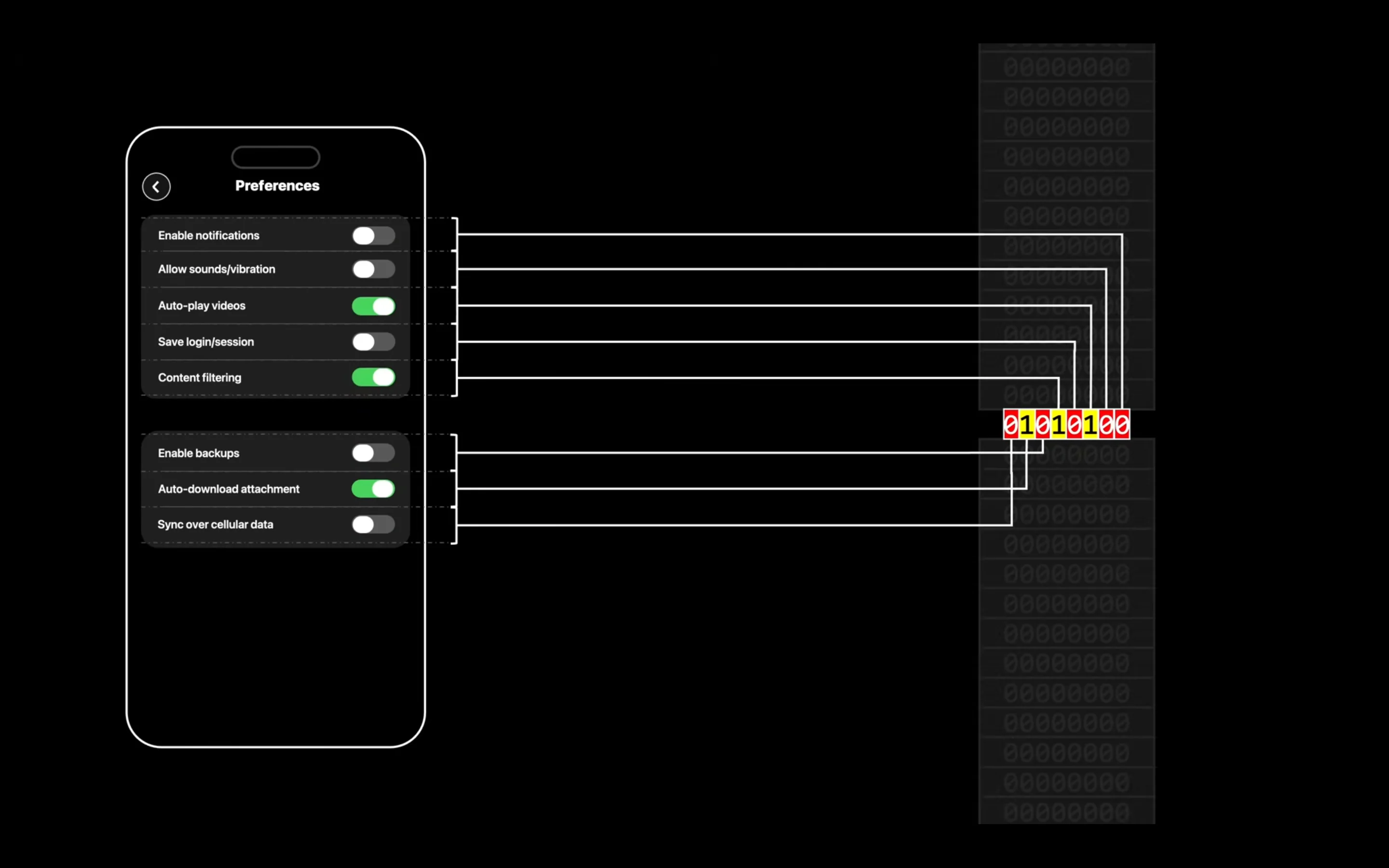
After using Bit Packing
4. Technical Implementation: Set, Clear, Toggle, and Read
To manipulate bit n within a byte, we use the Mask concept.
- Set Bit (To 1):
word | (1 << n)We shift the number1byntimes to create a mask, then combine it with theORoperation [11:23]. - Clear Bit (To 0):
word & ~(1 << n)We create a mask with1at positionn, flip it withNOT, then performAND. This forces bit n to become0[12:24]. - Toggle Bit:
word ^ (1 << n)UsingXORwith a mask that only has the number1at the target position [13:19]. - Read Bit:
(word >> n) & 1Shift the target bit to the rightmost position (LSB), then use mask1with theANDoperation to get its pure value (0 or 1) [14:24].
5. Why So Many Hexadecimal Numbers?
In real code, developers rarely type long binary like 00001000. This is very error-prone. Instead, they use Hexadecimal [17:52].
One hexadecimal character (0-F) represents exactly 4 bits. This makes it easier to mentally map between code and bit structure in memory. So, if you see 0x80, system developers know that’s bit 7 active in one byte.
Conclusion
Bitwise operations are the bridge between software logic and the physical reality of hardware. Although rarely used in modern web development, understanding this concept is crucial for fields such as:
- Embedded Systems: Where memory is very limited [15:05].
- Data Compression: Algorithms that reduce video or image size heavily rely on bit manipulation [16:44].
- Cryptography: Modern cybersecurity is built on fast and efficient bitwise operations.
Understanding this “weird” code means you’re starting to understand the native language of the machines you use every day.
Comments & Discussion